Thursday, 24 February 2011

Usercontrol vs Custom Controls

Introduction

Both User Control and Custom Control can be created to avoid the work repeatation. Both can be used in multiple applications. Still it is a confusion for many programmers where to use which control .This article explains the difference between both and give a solution to use it as best choice in various applicaitons.

Paragraph Heading 1

Difference in some factors :

* Creation :

User Control : Creation is similar to the way Web Forms pages are created; well-suited for rapid application development (RAD)

Custom Control :Writing involves lots of code because there is no designer support

* Content :

User Control : A much better choice when you need static content within a fixed layout, for example, when you make headers and footers

Custom Control : More suited for when an application requires dynamic content to be displayed; can be reused across an application, for example, for a data bound table control with dynamic rows

* Design :

User Control : Writing doesn't require much application designing because they are authored at design time and mostly contain static data

Custom Control :Writing from scratch requires a good understanding of the control's life cycle and the order in which events execute, which is normally taken care of in user controls.

Paragraph Heading N

Difference in Deployment of Both Controls

User Control

1. Designed for single-application scenarios
2. Deployed in the source form (.ascx) along with the source code of the application
3. If the same control needs to be used in more than one application, it introduces redundancy and maintenance problems

Custom Control :

1. Designed so that it can be used by more than one application
2. Deployed either in the application's Bin directory or in the global assembly cache
3. Distributed easily and without problems associated with redundancy and maintenance

Summary


User Control and Custom Control can be used in option of each other. But the best practice is to use proper control at proper place. This article will help to find the best use of these controls in various applications.

Shortcut keys of Dotnet

Ctrl + N :- Opens the New Project Dialogue BoxCtrl + Shift + O :- Opens the Open File Dialog BoxCtrl + Shift + A :- Opens Add New Item windowCtrl + D :- Opens Add Existing Item windowCtrl + S :- Saves Current FormCtrl + Shift + S :- Saves everything from ApplicationAlt + Q :- Exits Visual Studio NETCtrl + Z :- UndoCtrl + Shift + Z :- RedoCtrl + X :- Cuts your selectionCtrl + C :- Copies your selectionCtrl + V :- Pastes your selectionCtrl + A :- Selects AllDel :- Deletes your selectionCtrl + F :- Opens Find windowCtrl + H :- Opens Find and Replace windowCtrl + Shift + H :- Opens Replace in Files windowCtrl + Alt + Shift + F12 :- Opens Find Symbol windowF7 :- Opens Code Designer window


Shift + F7 :- Gets you back to Design View
Ctrl + R :- Opens the Solution Explorer window
Ctrl + Alt + S :- Opens the Server Explorer window
Ctrl + Shift + C :- Opens the Class View window
F4 :- Opens the Properties window
Ctrl + Shift + E :- Opens the Resource view window
Ctrl + Alt + X :- Opens the Toolbar window
Shift + Alt + Enter :- Takes you to Full Screen View
Alt+F8 :- Opens Macro Explorer window
F2 :- Opens Object Browser window
Ctrl + Alt + T :- Opens Document Outline window
Ctrl + Alt + K :- Opens Task List window
Ctrl + Alt + A :- Opens Command window
Ctrl + Alt + O :- Opens Output window
Ctrl + Alt + Y :- Opens Find Symbol Results window
Ctrl + Alt + F :- Lists Items under the Favorites Menu in your
Ctrl + Shift + B :- Builds your project
F5 :- Runs your Application
Ctrl + F5 :- Runs your Application without Debugging
Ctrl + Alt + E :- Opens the Exceptions Dialog Box
F8 :- Used while Debugging Applications
Shift + F8 :- Used While Debugging Applications
Ctrl + B :- Inserts a New Breakpoint
Ctrl + Shift + F9 :- Clears All Breakpoints
Ctrl + Alt + P :- Opens the Processes Dialog box
Ctrl + T :- Opens Customize Toolbox window
Ctrl + Shift + P :- Runs Temporary Macro
Ctrl + Shift + R :- Records Temporary Macro
Alt + F11 :- Opens Macros IDE
Ctrl + F1 :- Opens Dynamic Help window
Ctrl +Alt + F1 :- Opens Help window sorted by Contents
Ctrl + Alt + F2 :- Opens Help window sorted by Index
Ctrl + Alt + F3 :- Opens Help Search window
Shift + Alt + F2 :- Opens Index Results window
Shift + Alt + F3 :- Opens Search Results window

Server.Transfer Vs. Response.Redirect

Server.Transfer is similar in that it sends the user to another page with a statement such as Server.Transfer("WebForm2.aspx"). However, the statement has a number of distinct advantages and disadvantages.
Firstly, transferring to another page using Server.Transfer conserves server resources. Instead of telling the browser to redirect, it simply changes the "focus" on the Web server and transfers the request. This means you don't get quite as many HTTP requests coming through, which therefore eases the pressure on your Web server and makes your applications run faster.
But watch out: because the "transfer" process can work on only those sites running on the server, you can't use Server.Transfer to send the user to an external site. Only Response.Redirect can do that.
Secondly, Server.Transfer maintains the original URL in the browser. This can really help streamline data entry techniques, although it may make for confusion when debugging.
That's not all: The Server.Transfer method also has a second parameter—"preserveForm". If you set this to True, using a statement such as Server.Transfer("WebForm2.aspx", True), the existing query string and any form variables will still be available to the page you are transferring to.
For example, if your WebForm1.aspx has a TextBox control called TextBox1 and you transferred to WebForm2.aspx with the preserveForm parameter set to True, you'd be able to retrieve the value of the original page TextBox control by referencing Request.Form("TextBox1").
This technique is great for wizard-style input forms split over multiple pages. But there's another thing you'll want to watch out for when using the preserveForm parameter. ASP.NET has a bug whereby, in certain situations, an error will occur when attempting to transfer the form and query string values. You'll find this documented at http://support.microsoft.com/default.aspx?id=kb;en-us;Q316920.
The unofficial solution is to set the enableViewStateMac property to True on the page you'll be transferring to, then set it back to False. This records that you want a definitive False value for this property and resolves the bug.
So, in brief: Response.Redirect simply tells the browser to visit another page. Server.Transfer helps reduce server requests, keeps the URL the same and, with a little bug-bashing, allows you to transfer the query string and form variables.
Top Tip: Don't confuse Server.Transfer with Server.Execute, which executes the page and returns the results. It was useful in the past, but, with ASP.NET, it's been replaced with fresher methods of development. Ignore it.

What is the difference between login controls and Forms authentication?

What is the difference between login controls and Forms authentication?

  • Forms authentication can be easily implemented using login controls without writing any code.
  • Login control performs functions like prompting for user credentials, validating them and issuing authentication just as the FormsAuthentication class.
  • However, all that’s needs to be dne is to drag and drop the use control from the tool box to have these checks performed implicitly. 
  • The FormsAuthentication class is used in the background for the authentication ticket and ASP.NET membership is used to validate the user credentials. 

Login control provides form authentication. If we implement for authentication through form authentication then we do it through code. On the other hand, login control allows the easy implementation on the basis of form authentication without writing much of code. Underneath the control, the class used for login control is also FormAuthentication class. So instead of creating your own set of user credential validations and issuing of authentication ticket, it is simpler to use a normal login control.

How many types of assemblies are there , what are they?

How many types of assemblies are there , what are they?

Assemblies are the building blocks of .NET Framework applications. Public assembly- are the dll/exe file that can be used in different application. The main advantage of public assemblies is code reusability. Private assembly -is the assembly used inside the appliccationShared assembly- to run multiple versions of an application or component on the same computer. Satellite assembly -used for multi-cultural application in .NET
 

Assemblies are 3 types1.private (Available for the same programm)2. public/shared (saved in Global Assemblie cache for all .net assemblie)3. sattilite assemblies

Lets see the steps to create this
Use sn -k for strong naming
Then use GACUTIL -i to install the assembly into GAC.


.Net Assembly can be classified in four Categories:

  (A)  With Respect to  Program Access.
         
i) Private Assembly- It can be used only in one application.
         ii) Public/Shared Assembly- It can be used by all applications in the server.

  (B)  With Respect to Number of Resources.
         
i) Static Assembly- It uses fixed resources.
         ii) Dynamic Assembly- It supports dynamic creation of resouces or files at   
             runtime programatically.

  (C) With Respect to Deployment.
         i) Satellite Assembly- Easily Deployable. (Visual Studio 2005).
        ii) Resource-Only Assembly- In Visual Studio 2003.

  (D) With Respect to Number of Assemblies.
        
i) Single File Assembly- /Bin/x.dll

        ii) Multi File Assembly- /Bin/x.dll
                                                   y.dll
                                                   z.dll 
                                                    ---
                                                    ---
                                                    ---


Encrypting Connection Strings in web.config file

Encrypting Connection Strings in web.config file

Introduction
ASP.NET stores all the configuration information in plain text files called web.config and machine.config files. We store all vital information including database connection strings, user names, passwords for the databases. Thus you end up storing all sensitive information in vulnerable plain text files which is nothing but security compromise.
Taking a clue, Microsoft has provided the capability to encrypt sensitive information in configuration files including connection strings in ASP.NET 2.0. With this new capability you can easily encrypt sections of configuration files which makes your application secure.
This new capability brings it with performance overhead that occurs when you encrypt or decrypt sections of web.config files. So use it sparingly. That means be judgmental and judicious when you decide to encrypt data.
ASP.NET 2.0 introduced Protected Configuration model that allows you to encrypt data using two Protected Configuration Providers. They are:
o        RSAProtectedConfigurationProvider: This is the default provider and uses the RSA Public Key Encryption algorithm to encrypt and decrypt data.
o        DataProtectionConfigurationProvider: This provider uses Windows Data Protection Application Programming Interface (DPAPI) to encrypt and decrypt data.
Let's explore this new capability of encrypting and decrypting of connection strings in web.config files using above two providers available in ASP.NET 2.0.
Programmatic Encryption/Decryption
Take web.config file which contains valid connection string from some existing project. Bellow is an example of configuration section.
<configuration>
       <appSettings/>
       <connectionStrings>
  <add name="NorthwindConnectionString" connectionString="Data Source=ARAS02-XP;Initial Catalog=Northwind;User ID=sa"
   providerName="System.Data.SqlClient" />
 </connectionStrings>
       <system.web>
             <compilation debug="true"/>
             <authentication mode="Windows"/>
    <pages theme="Theme1" />
             </system.web>
</configuration>
You can observe <connectionStrings> section in above sample which contains connection string information.
Add new form to your existing project and add the below method EncryptConnString() to code behind of the form. We will use RSAProtectedConfigurationProvider model to encrypt the connection strings. We will try to analyze this magic piece of code. Let's start with namespaces. The System.configuration namespace contains classes which deal with the configuration information associated with client applications and ASP.NET applications. The System.Web.Configuration.WebConfigurationManager class is the preferred way to provide programmatic access to configuration files of ASP.NET web applications. You can use one of open methods provided by WebConfigurationManager that return configuration object which in turn provides the required methods and properties to handle the underlying configuration files. The GetSection method of configuration object returns the connectionStrings section object for the web.config file.
using System.Web.Configuration;
using System.Web.Security;
using System.Configuration;

public void EncryptConnString()
    {
    
Configuration config = WebConfigurationManager.OpenWebConfiguration(Request.ApplicationPath);
       ConfigurationSection section = config.GetSection("connectionStrings");
        if (!section.SectionInformation.IsProtected)
        {
            section.SectionInformation.ProtectSection("RsaProtectedConfigurationProvider");
            config.Save();
        }
    }
Encrypting Connection string using RSAProtectedConfigurationProvider model
You can observe in below listing that connectionStrings section is encrypted when we execute above method using RsaProctectedConfigurationProvider model.
<connectionStrings configProtectionProvider="RsaProtectedConfigurationProvider">
  <EncryptedData Type="http://www.w3.org/2001/04/xmlenc#Element"
   xmlns="http://www.w3.org/2001/04/xmlenc#">
   <EncryptionMethod Algorithm="http://www.w3.org/2001/04/xmlenc#tripledes-cbc" />
   <KeyInfo xmlns="http://www.w3.org/2000/09/xmldsig#">
    <EncryptedKey xmlns="http://www.w3.org/2001/04/xmlenc#">
     <EncryptionMethod Algorithm="http://www.w3.org/2001/04/xmlenc#rsa-1_5" />
     <KeyInfo xmlns="http://www.w3.org/2000/09/xmldsig#">
      <KeyName>Rsa Key</KeyName>
     </KeyInfo>
     <CipherData>
      <CipherValue> NQPKYTuUVO5SWpxXdBUpoMKYYUmEBBuAw8LXe+DxMYrkMzzAJsUVw6uZZLJXWa9ipAEx hvS2hhkGx7MHkpustn+IT+PpuxtIKSDFkumZdA/3kcaHuSO74M75Qt+BmW42v/KWNwVv 7umXLz78ka4jDeY/yf2BMpkcs35TkSS9PVM=</CipherValue>
     </CipherData>
    </EncryptedKey>
   </KeyInfo>
   <CipherData>
    <CipherValue> MVKe6xdu6h4DqGHmzuzeBqaWcL+m+Rl0EHi9uwQAqhZ9N56HzGgC66cXEiDJ8IGaSCrAYm 7z2ERQYKwjMyTJMkiJ3cSk7CSgqxfrT3+7+DzzKMkB489AmADfxtRyt3JE0bWIclhsHgLn YthS6mMiXTusSzRIcPMESb+ZAIkyCTPt6+2BxDNimgFX42Xt7abvNinknaUk
uJYKr7tgOzVfS00IesVA/jou1t8FTjM14b9YGvHPtBDq00Jm/cD9iGtP2OM6RnhLgy+MUr 3NPiuWutsEcUGELfOwkMvKQ6Igsg6eqae4c0dZlg==</CipherValue>
   </CipherData>
  </EncryptedData>
 </connectionStrings>
Similarly, we can encrypt connectionStrings information using DataProtectionConfigurationProvider model. Use the same above method and replace parameter for ProtectSection method with DataProtectionConfigurationProvider as shown below.
section.SectionInformation.ProtectSection("RsaProtectedConfigurationProvider");
<configuration>
       <appSettings/>
       <connectionStrings configProtectionProvider="DataProtectionConfigurationProvider">
  <EncryptedData>
   <CipherData>
    <CipherValue> AQAAANCMnd8BFdERjHoAwE/Cl+sBAAAAcHu0TgBbIEyfG1RWWqIDSgQAAAACAAAAAAADZg AAqAAAABAAAACSAX+UlFBbL2xUT1mYruSgAAAAAASAAACgAAAAEAAAAODHdp8b3SFHl8S6 yVQ/Ydu4AQAAitMpkAI8SjZc349E63yEAV/mVQzOv29H2mXvz2j+2kg8FTGYV95xySZrUH ICx/i5hBq//iQNc1v/Jp0xLxJf6+K/nSQwJTnGWBn3555HJHKU8yAeQCN9Iw/6YWs/q6oV GpPwMmoSe6jS+5bHzThxQrpUqxVXB4aHKeVnAfjcdj5bIBKe9jaZ0kP31UVlB9TB5z+94G a6LNWuWWcZf/iAfrZ/EZMkEcGJE20Reb3XSm/e+LN1di2YyRxXVYV+b6MDTi7DgHC7ilZs g+/81jCn2UtW4k74wKDXrTjAS3LgWxBdFEUPnwSKbKF+/DF24MVECZ6t7oyxoPH7OqaxR/ IDnPLxHAqtd8eT9VKmzouULpQBwrO6echS1MJL8zmvCNMsLz1JnyBlwxYvst8tQs+5MCIn dQ1K9615hLiwP/JIUy9T3Hk1pCn37m8tEV+meRguS1yIOXMQ3nsPUI5d1C+Nt4068EecEk uoWujCEUHu9JcpZa2KVsnSYLix5MOEvqGPtbSMmTt7TE7leicEpEn6Hm3LWYQE2N85Skpt x5AN/Pfuwl42fMzzs07ZhRFtLDwku/a2/ZQahHIUAAAAdOITPi1vY6agWisqaA6+H/qOoc s=</CipherValue>
   </CipherData>
  </EncryptedData>
 </connectionStrings>
       <system.web>
             <compilation debug="true"/>
             <authentication mode="Windows"/>
    <pages theme="Theme1" />
             </system.web>
</configuration>
Encrypted Connection String using DataProtectionConfigurationProvider
You can in the similar way decrypt connection strings information using below method.
public void DecryptConnString()
    {
        Configuration config = WebConfigurationManager.OpenWebConfiguration(Request.ApplicationPath);
        ConfigurationSection section = config.GetSection("connectionStrings");
        if (section.SectionInformation.IsProtected)
        {
            section.SectionInformation.UnprotectSection();
            config.Save();
        }
    }
Remember, we cannot encrypt all sections of web.config file using this above programmatic approach. There are few sections which need some additional steps before we can encrypt them with above approach.
o        <processModel>
o        <runtime>
o        <mscorlib>
o        <startup>
o        <system.runtime.remoting>
o        <configProtectedData>
o        <satelliteassemblies>
o        <cryptographySettings>
o        <cryptoNameMapping>
o        <cryptoClasses>
In order to encrypt these configuration sections you must encrypt the value and store it in the registry. There's an aspnet_setreg.exe command-line tool to help along with this process.


Encryption/Decryption using aspnet_regiis.exe command line tool

You can also encrypt and decrypt sections in the Web.config file using the aspnet_regiis.exe command-line tool, which can be found in the <WINDOWSDIR>\Microsoft.Net\Framework\version directory. To encrypt a section of the Web.config using the DPAPI machine key with this command-line tool, use following command.
aspnet_regiis.exe -pe "connectionStrings" -app "/YourWebSiteName" –prov "DataProtectionConfigurationProvider"
To decrypt connectionStrings section using this tool, you can specify following command in aspnet_iisreg.exe tool.
aspnet_regiis.exe -pd "connectionStrings" -app "/YouWebSiteName"
Even though, ASP.NET is configured to reject all HTTP requests for resources with .config extension, but, if the malicious user gains access to web server's file system then sensitive information in configuration file will be disclosed. Fortunately, ASP.NET 2.0 mitigates this problem by introducing encryption schemes for configuration files. You can either encrypt/decrypt configuration files including Web.config and Machine.config either programmatically or using aspnet_regiis.exe tool.

Tuesday, 22 February 2011

Simple Code First with Entity Framework 4 - Magic Unicorn Feature CTP 4

Microsoft's been releasing a number of right-sized LEGO pieces lately. In case you missed it, Betas have been announced for:
  • SQL 4 Compact Edition - It has a small embedded file-based SQL Database, and a web-server called IIS Express that's compatible with the full version of IIS.
  • "Razor" Page Syntax - A way to make pages/ViewEngine called "Razor." Your sites can be later be expanded to use all of ASP.NET MVC. It's a simple syntax that is easy to learn.
  • WebMatrix - It's a small (15 megs if you have .NET 4, 50megs if you don't) lightweight IDE for making ASP.NET or PHP websites. Good for non-pro developers.
    • It uses the WebDeploy engine to deploy apps to hosts, setting up permissions, copying databases, etc.
    • WebMatrix also has the free Search Engine Optimization Toolkit built in, so you can spider your own site and see how Search Engines see it. It'll make recommendations and store reports.
  • IIS Express - A version of the IIS 7.5 Web Server that can be run as non-admin, isn't installed as a service, that will also integrate with Visual Studio
More details to come on all this. Howver, on the tooling side, I did get a chance to talk to Damian Edwards, a developer working on some of this stuff and I put video up on Channel 9 yesterday.
There's lots of cool pieces that are packaged up with WebMatrix initially, but these pieces are interesting for pro developers as well.
Still, something's missing.
In my mind, it's been too hard to talk to databases. I like LINQ to SQL and used it on the first NerdDinner version, but since EF4 sucks so much less is way better than earlier versions of EF, Jon and I updated NerdDinner to use EF. It was easy, but I would have liked to code first, and code only if I could.
Microsoft announced a new Entity Framework CTP today. It has the romantic and wonderful name "Microsoft ADO.NET Entity Framework Feature CTP4" which is lame. You can say "EF Feature CTP4" but I like "EF Magic Unicorn Edition" but that's just me. We're getting the tech better at Microsoft but still can't get naming right. Whadayagonnado? Still, it makes EF a pleasure.
It's got a lot of interesting features and choices, and while it's still a CTP, you should take a minute and check it out. 
To get a more detailed version of this walkthrough plus downloadable sample code, check out the ADO team's excellent blog post.

Quick CRUD via a Code First Model

After you install it (it won't mess up your system if you do), go and create a new whatever project. For my little example, I'll make a new ASP.NET MVC Website. It works for me better than a console app to illustrate a point.
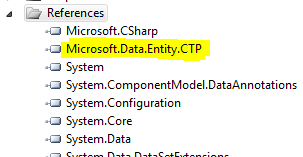
Add a reference to Microsoft.Data.Entity.CTP.dll.
image
Make a new class, maybe in the Models folder, and name it something like Book. Add some code like this. Notice it's just code. Nothing derives from anything.
1
2
3
4
5
6
7
8
9
public class Book
{
    [Key]
    public int ISBN { get; set; }
    [Required]
    public string Title { get; set; }
    public DateTime FirstPublished { get; set; }
    public bool IsFiction { get; set; }
}
Notice I've put [Key] and [Required] on this class, but if that bothers me, I could put these kinds of declarations in a more fluent way in my database context class, in OnModelCreating.
1
2
builder.Entity<Book>().HasKey(b => b.ISBN);
builder.Entity<Book>().Property(b => b.Title).IsRequired();
To access my data, Here's a SimpleBookCatalog...
1
2
3
4
public class SimpleBookCatalog : DbContext
{
    public DbSet<Book> Books { get; set; }
}
Next, I'll make a new Controller, via right|click Add Controller. I'll make a BookController.
1
2
3
4
5
6
7
8
9
10
11
public class BookController : Controller
{
    SimpleBookCatalog db = new SimpleBookCatalog();
    public ActionResult Index()
    {
        var books = db.Books;
        return View(books);
    }
    ...
}
I'll right click on the Index method and make an Index view. Then I'll run my app.
image
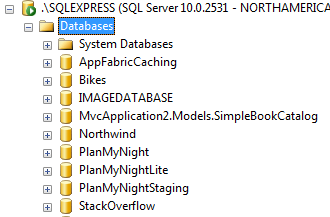
No data. What if I look in my SQL Management Studio? I got a Database created for me with a convention-based name since I didn't supply one.
SQL Management Studio with an automatically named Database
If I specified a different connection string, that DB could be anywhere.
However, if use a different database provider, like say, a SQL 4 Compact Edition one, setting it as the default in my Application_Start:
1
2
Database.DefaultConnectionFactory = new SqlCeConnectionFactory("System.Data.SqlServerCe.4.0");
Then when I run my app and look in my App_Data folder:
SQL Compact Edition Database file in App_Data
So I got a file based database without doing anything and I don't need SQL Server. (Yes, I can change the name, location, etc.) If I do nothing, I get a reasonable convention.
Next, I'll add two Create methods, one for a GET and one for a POST. In Create, I'll add my new book and save the changes:
1
2
3
4
5
6
7
8
9
10
11
12
public ActionResult Create()
{
    return View();
}
[HttpPost]
public ActionResult Create(Book book)
{
    db.Books.Add(book);
    db.SaveChanges();
    return RedirectToAction("Index");
}
I'll right click, Add View, and make a Create View. Run my app, look at the empty list, then click Create.
My Create Form
Click Create, and I'm redirected back to the Index page:
Book List
Back on the Index page, I can change the link to Details to use our primary key:
1
<%: Html.ActionLink("Details", "Details", new { id=item.ISBN })%> |
Create a Details View and add a Details method:
1
2
3
4
5
public ActionResult Details(int id)
{
    var book = db.Books.Find(id);
    return View(book);
}
See that Find method? That's there automatically. I can certainly use al the LINQy goodness as well, but as you can see, CRUD is simple. I can hook up Edit and Delete in a few minutes as well.
Here's the whole thing:
1
2
3
4
5
6
7
8
9
10
11
12
13
14
15
16
17
18
19
20
21
22
23
24
25
26
27
28
29
30
31
32
33
34
35
36
37
38
39
40
41
42
43
44
45
46
47
48
49
50
51
52
53
54
55
56
57
58
59
60
61
62
63
public class BooksController : Controller
{
    SimpleBookCatalog db = new SimpleBookCatalog();
    public ActionResult Index()
    {
        var books = db.Books;
        return View(books);
    }
    // GET: /Books/Details/5
    public ActionResult Details(int id)
    {
        var book = db.Books.Find(id);
        return View(book);
    }
    // GET: /Books/Create
    public ActionResult Create()
    {
        return View();
    }
    [HttpPost]
    public ActionResult Create(Book book)
    {
        db.Books.Add(book);
        db.SaveChanges();
        return RedirectToAction("Index");
    }
    // GET: /Books/Edit/5
    public ActionResult Edit(int id)
    {
        return View(db.Books.Find(id));
    }
    // POST: /Books/Edit/5
    [HttpPost]
    public ActionResult Edit(int id, FormCollection collection)
    {
        var book = db.Books.Find(id);
        UpdateModel(book);
        db.SaveChanges();
        return RedirectToAction("Index");
    }
    // GET: /Books/Delete/5
    public ActionResult Delete(int id)
    {
        var book = db.Books.Find(id);
        return View(book);
    }
    // POST: /Books/Delete/5
    [HttpPost]
    public ActionResult Delete(int id, FormCollection collection)
    {
        db.Books.Remove(db.Books.Find(id));
        db.SaveChanges();
        return RedirectToAction("Index");
    }
}
So that's a nice simple controller that uses a model that was written in just code. The database and its schema was created for me. The DbContext is LINQable with stuff like Add, Find, and Remove all just there. Plus, it's all EF under the hood, so if you need more complex stuff, you can do it.
For example, here's a more complex Code First Model with Collections, and more attributes. I show some fluent wiring up of relationships later on, although there are conventions that can assign bi-directionality based on naming.
1
2
3
4
5
6
7
8
9
10
11
12
13
14
15
16
17
18
19
20
21
22
23
24
25
26
27
28
29
30
31
32
33
34
35
36
37
38
39
40
41
42
43
44
45
46
47
48
49
50
public class Book
{
    [Key]
    public int ISBN { get; set; }
    [Required]
    public string Title { get; set; }
    [Required]
    public DateTime FirstPublished { get; set; }
    [Required]
    public bool IsFiction { get; set; }
    public virtual Publisher Publisher { get; set; }
    [RelatedTo(RelatedProperty="Author")]
    public virtual Author Author { get; set; }
}
public class Person
{
    [ScaffoldColumn(false)]
    public int PersonId { get; set; }
    public string FirstName { get; set; }
    public string LastName { get; set; }
}
public class Author : Person
{
    [ScaffoldColumn(false)]
    public int AuthorId { get; set; }
    public virtual ICollection<Book> Books { get; set; }
}
public class Publisher
{
    [ScaffoldColumn(false)]
    public int PublisherId { get; set; }
    [Required]
    [MaxLength(50)]
    public string Name { get; set; }
    public virtual ICollection<Book> Books { get; set; }
}
public class SimpleBookCatalog : DbContext
{
    public DbSet<Book> Books { get; set; }
    public DbSet<Person> People { get; set; }
    public DbSet<Author> Authors { get; set; }
    public DbSet<Publisher> Publishers { get; set; }
}
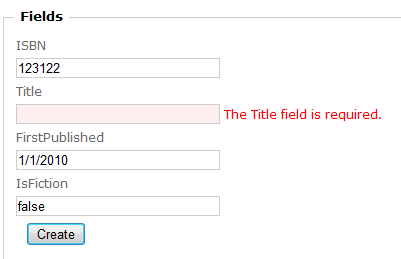
Also, "Magic Unicorn EF" supports DataAnnotations (or validation via Fluent interfaces), so those [Required] and [StringLength] stuff from before? Those apply not only in JavaScript, but also at the Server-side and Database persistence layers.
image
You can make your own strategies for creating databases, based on what's going on with the model, if it's changed, etc. Here's some built-in examples. Yours can do whatever you like. Here the SimpleBookCatalog is the DbContext from before.
1
2
3
4
5
6
//This is the default strategy.  It creates the DB only if it doesn't exist
Database.SetInitializer(new CreateDatabaseOnlyIfNotExists<SimpleBookCatalog>());
//Recreates the DB if the model changes but doesn't insert seed data.
Database.SetInitializer(new RecreateDatabaseIfModelChanges<SimpleBookCatalog>());
//Strategy for always recreating the DB every time the app is run.
Database.SetInitializer(new AlwaysRecreateDatabase<SimpleBookCatalog>());
Connection Strings for the SQL 4 CE provider are simpler (like, they are possible to memorize, which is amazing, considering how hard they are now). For example:
1
2
<add name="SimpleBookCatalog" connectionString="Data Source=C:\FooFoo\MyBooks.sdf" providerName="System.Data.SqlServerCe.4.0"/>
Here's some examples of fluent mappings and setting up relationships to give you an idea of the kinds of things you can do, while avoiding looking at any visual designers. It all depends on how clean you need your POCO (Plain Old CLR Objects) to be.
1
2
3
4
5
modelBuilder.Entity<Book>().HasKey(b => b.ISBN);
modelBuilder.Entity<Book>().HasRequired(b => b.Title);
modelBuilder.Entity<Book>().HasRequired(b => b.Author).WithMany(a => a.Books);
modelBuilder.Entity<Publisher>().Property(p => p.Name).MaxLength = 50;
modelBuilder.Entity<Author>().HasMany(a => a.Books).WithRequired();
These configurations can be batched up into a class that handles configuration for a specific entity so you can reuse them and more easily config like this.
1
builder.Configurations.Add(new BookConfiguration());
All this is a really basic example as a means of introduction and for my own learning, but so far I like it. It takes just a few minutes to get a lot done without much code. Since this is all Entity Framework, I can put an OData service on top of my model really quickly and then start consuming those services from iPhones or whatever.
It'll be interesting to take a sample like Nerd Dinner or MVC Music Store and change them to use Code First EF and the Razor View Engine and see if they are more readable and how many fewer lines of code they are.
Related Links